
Progress Tracking in Corporate English Training: How Managers Can Track English Growth Across Their Team


Corporate English Training Should Not Be a Black Box
Many companies invest in English training because they want better communication at work. They want employees to speak with more confidence, understand instructions, communicate with customers, participate in team conversations, and grow into more responsibility.
But too often, managers have very little visibility into what is actually happening.
Employees may attend class, but leaders may not know who is participating regularly. Employees may complete lessons, but managers may not know what they are practicing. Teachers may see growth, but the company may not receive clear updates. By the time anyone asks whether the program is working, the answer is often vague.
That is a problem.
Corporate English training should not leave managers guessing. If a company is investing in language growth, it should be able to see participation, task completion, progress, feedback, and next steps.
That is why AIR Language gives employers platform access and biweekly progress reports that show how employees are engaging, what tasks they have completed, how they are improving, and what they should practice next.

Managers gain immediate visibility into employee engagement, completed tasks, and overall language development through the AIR Language reporting dashboard.
Why Progress Reporting Matters
Progress reporting matters because language training is not just an employee benefit. For many companies, it is connected to business outcomes.
Better English communication can affect customer service, safety, teamwork, leadership readiness, employee confidence, and daily operations. If training is connected to those outcomes, managers need a way to see whether the program is moving in the right direction.
A good progress report helps answer practical questions:
Who is participating?
Who is completing practice between classes?
What assigned tasks have employees completed?
What content are employees working on?
Who is making steady progress?
Who needs more support?
What skills should each employee practice next?
Is the training connected to the company’s communication goals?
Without this visibility, corporate language training can feel disconnected from the business. With it, managers can support employees more intentionally and make better decisions about the program.
What AIR Language Tracks
AIR Language tracks the parts of training that help managers understand both effort and growth.
That can include:
Active learners
Class participation
Assigned task completion
Completed assignments
Reading activity
Speaking tasks
Platform usage
Job-specific content completed
Instructor feedback
Language growth over time
Individualized next steps
The goal is not to overload managers with data. The goal is to make progress easy to understand.
A manager does not need a complicated academic report. They need a clear view of who is using the program, who is completing the work, who is growing, and what each employee should do next.
Employers Get Platform Access
One of the strongest parts of AIR Language’s corporate training model is that employers are not locked out of the learning process.
Employers receive access to the platform so they can see activity and progress in one place. This gives HR leaders, business owners, operations leaders, or managers a clearer view of how employees are engaging with the program.
This matters because corporate language training should not depend only on occasional updates or informal conversations. Managers should be able to see whether employees are using the platform, completing assigned tasks, practicing between classes, and building momentum over time.
Platform access helps companies turn English training into a visible, manageable program.

Employer platform access provides a centralized view of participation, learning activity, and progress across the entire team.
Biweekly Reports Keep Managers Informed
Platform access gives employers visibility. Biweekly reports make that visibility easier to act on.
Every two weeks, AIR Language checks in on employee progress, reviews assigned tasks, and reports what has been completed. These tasks may include reading activities, speaking practice, job-specific lessons, vocabulary review, Ari conversation practice, or workplace communication assignments.
This matters because corporate language training should not rely only on attendance. Employees need to practice between classes, and employers need to know whether that practice is happening.
AIR Language reports task completion to the employer, along with participation, platform activity, language growth, feedback, and next steps for each employee.
A biweekly report can help managers see patterns such as:
Employees are completing assigned practice between classes.
Some learners need reminders or additional support.
Certain employees are ready for more challenging tasks.
Speaking practice is increasing across the team.
The team is building stronger communication habits.
The training is producing visible progress over time.
That makes the program easier to manage and easier to connect to business goals.
Tasks and Check-Ins Create Accountability
AIR Language does not just assign content and hope employees complete it.
Employees receive specific tasks to complete between live classes. These tasks are connected to their English level, workplace needs, and communication goals. They may include job-specific reading, vocabulary practice, speaking tasks, Ari conversation practice, or short assignments built around real workplace situations.
Every two weeks, AIR Language checks in on task completion and progress. We review what each employee has completed, identify where support is needed, and report completion back to the employer.
This creates a simple accountability loop:
Employees receive targeted practice tasks.
Employees complete those tasks on the AIR Language platform.
AIR Language reviews participation and completion.
Employers receive biweekly reports showing what was completed.
Employees receive individualized next steps for continued growth.
This helps managers see whether employees are engaging with the program, not just attending class.

Assigned tasks and regular check-ins create accountability and help ensure employees continue practicing between live classes.
Individualized Next Steps Make the Reports More Useful
A progress report should not only show what happened. It should help people decide what to do next.
That is why AIR Language includes individualized next steps for employees. Each learner may need something different. One employee may need to practice customer questions. Another may need more listening practice. Another may need help explaining delays. Another may be ready to participate more in meetings or take on longer conversations.
Individualized next steps can include goals such as:
Practice asking clarification questions.
Complete more customer conversation lessons.
Review safety vocabulary.
Practice explaining a process step by step.
Build confidence with phone conversations.
Use more professional phrases with customers.
Prepare for supervisor conversations.
Strengthen pronunciation of key workplace terms.
This makes feedback practical. Employees know what to practice, and managers know how to support them.
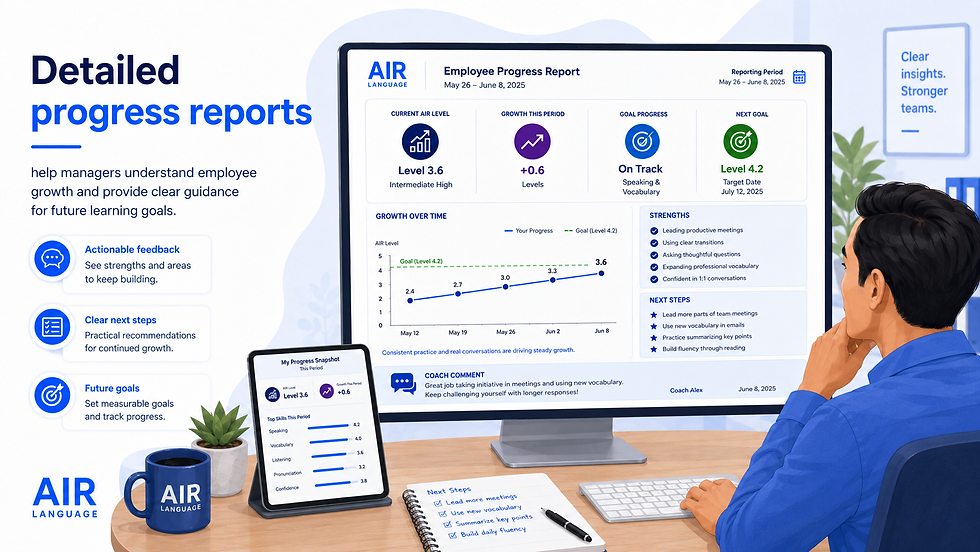
Detailed progress reports help managers understand employee growth and provide clear guidance for future learning goals.
Team-Wide Reporting Helps Managers Spot Patterns
Individual feedback is important, but team-wide reporting gives managers a broader view.
A team report can show whether the whole group is participating, whether practice is increasing, whether assigned tasks are being completed, and whether language growth is happening across the company. It can also highlight top performers, employees with strong participation, and areas where the team needs more support.
For example, a manager may notice that employees are completing many reading tasks but fewer speaking tasks. That tells the company where to encourage more practice. Another manager may notice that one department is participating more consistently than another. That creates an opportunity to adjust schedules, support employees, or communicate expectations more clearly.
Team-wide reporting helps managers move from guessing to acting.
Reporting Makes Training More Accountable
Corporate training works better when everyone can see what is happening.
Employees understand that their effort matters. Managers can recognize progress. HR can evaluate participation. Leaders can see whether the investment is producing movement. Instructors can adjust the training based on real activity and real needs.
This does not mean language growth happens overnight. It means the company has a better system for supporting it.
Without reporting, training can become invisible. With reporting, progress becomes easier to see, discuss, and improve.
Progress Reporting Supports Better Conversations
Good reporting also creates better conversations between managers and employees.
Instead of saying, “How are English classes going?” a manager can ask more specific questions:
“I saw you completed several customer conversation lessons. Which ones helped most?”
“Your report says your next step is asking follow-up questions. Can we practice that in our next team meeting?”
“You completed your speaking tasks this period. Which one felt most useful?”
“You have been participating consistently. What kind of conversations do you want to practice next?”
“It looks like the phone call lessons are challenging. Would extra practice help?”
These conversations are more useful because they are grounded in actual progress.
Employees feel seen. Managers become more supportive. Training becomes part of the team’s growth instead of something separate from work.
Why AIR Language Includes Team-Wide Progress Reporting
AIR Language is not just a class provider. It is a connected corporate language training system.
Live classes give employees guided speaking practice. Job-specific content gives them language that connects to their work. The platform gives employees ongoing practice and gives employers visibility. Assigned tasks create structure between classes. Biweekly check-ins help AIR Language confirm what employees have completed. Personalized feedback gives learners direction. Progress reports give managers a clear view of team growth and individualized next steps.
Together, these pieces help companies answer the question that matters:
“Is this training helping our employees communicate better at work?”
With AIR Language, managers do not have to guess.
The Bottom Line
Team-wide progress reporting makes corporate English training more visible, more practical, and easier to manage.
Employers get platform access. Employees receive assigned practice tasks. AIR Language checks progress every two weeks and reports task completion, participation, growth, and individualized next steps back to the employer.
That is how language training becomes more than a class.
It becomes a measurable system for building clearer communication, stronger teams, and more confident employees.

Comments